
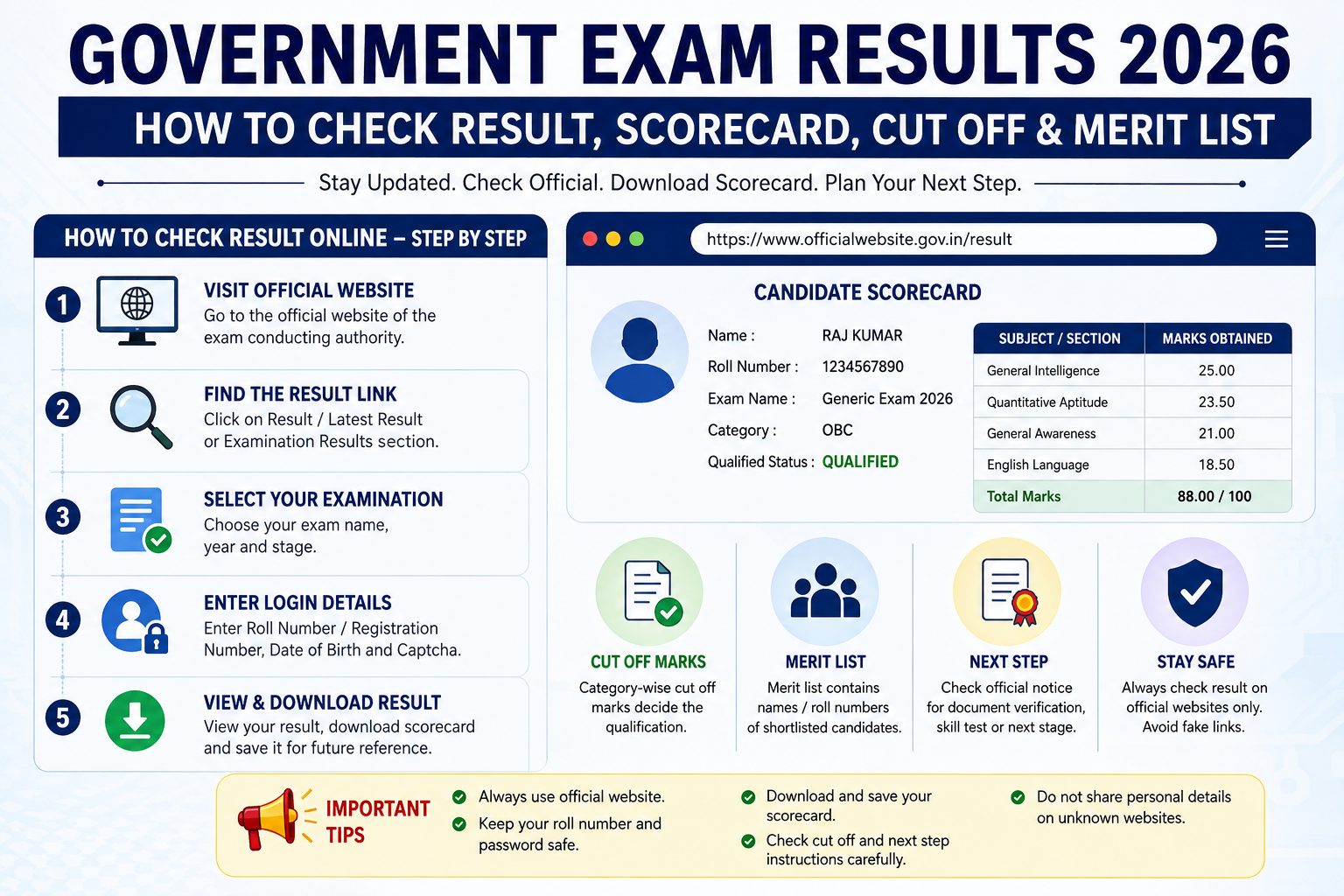
Government Exam Results 2026: How to Check Result, Scorecard, Cut Off and Merit List
Government examination results are one of the most important updates for candidates preparing for competitive examinations. After appearing in an examination, candidates usually wait for the result, scorecard, cut off marks and further selection process.
Results for examinations conducted by different recruitment and examination authorities are released through their respective official websites. Depending on the examination, candidates may need their registration number, roll number, date of birth, password or other login details to access the result.
In 2026, candidates can find result-related updates for examinations conducted by organisations such as the Staff Selection Commission, National Testing Agency, Railway Recruitment Boards, UPSC, state recruitment commissions and various educational authorities.
The National Testing Agency maintains an official examination-result section where candidates can access results and score-related updates for NTA-conducted examinations.
This guide explains how to check government exam results online, understand scorecards, check cut off marks, download merit lists and understand what happens after the result.
How to Check Government Exam Result 2026
The basic process for checking an examination result is generally simple.
Step 1: Visit the Official Website
First, visit the official website of the organisation that conducted your examination.
For example, depending on the examination, candidates may need to visit the official website of:
- SSC
- UPSC
- Railway Recruitment Boards
- NTA
- State Public Service Commission
- State Staff Selection Commission
- State Police Recruitment Board
- Other concerned recruitment authorities
Always make sure that you are using the genuine official website.
Step 2: Open the Result Section
Look for options such as:
Results
Result
Latest Results
Recruitment Results
or
Examination Results
The exact name may differ between organisations.
Step 3: Find Your Examination
Search for the result notification related to your examination.
Check the:
- Examination name
- Examination year
- Stage
- Result date
- Result type
For example, an examination may release separate results for:
- Preliminary examination
- Main examination
- Tier 1
- Tier 2
- Skill test
- Document verification
- Final selection
Step 4: Open the Result Link
Click the appropriate result link.
Some organisations publish a PDF containing roll numbers of shortlisted candidates, while others provide an online login-based scorecard.
Step 5: Enter Login Details
If the result requires login, enter the details requested on the official portal.
These may include:
- Registration Number
- Roll Number
- Date of Birth
- Password
- Application Number
- Captcha
Step 6: Download Your Result
After checking the result, download or save the scorecard/result for future reference.
It is recommended to keep a copy until the entire recruitment process is completed.
What Information Is Available in a Government Exam Result?
The information shown in a result depends on the examination.
A result or scorecard may contain:
| Information | Meaning |
|---|---|
| Candidate Name | Name of the candidate |
| Roll Number | Examination identification number |
| Registration Number | Application identification number |
| Marks | Marks obtained |
| Score | Examination score |
| Rank | Candidate's position where applicable |
| Qualifying Status | Whether the candidate qualified |
| Cut Off | Minimum qualifying/selection benchmark |
| Category | Candidate's applicable category |
| Paper/Subject Marks | Marks obtained in individual sections |
Not every examination displays all these details.
What Is a Scorecard?
A scorecard provides detailed information about a candidate's performance.
Depending on the examination, the scorecard can include:
- Section-wise marks
- Total marks
- Normalised marks
- Percentile
- Rank
- Qualifying status
- Category
- Cut off
- Candidate details
Candidates should download their scorecard whenever it is available.
Why Is the Scorecard Important?
A scorecard can be useful for:
- Checking marks
- Comparing performance
- Understanding qualifying status
- Further admission/recruitment processes
- Record keeping
- Future reference
Some examination authorities make scorecards available for a limited period, so candidates should not unnecessarily delay downloading them.
What Is the Cut Off?
The cut off is the benchmark used by an examination authority for determining qualification or shortlisting, depending on the examination rules.
The cut off can vary according to:
- Examination
- Category
- Vacancy
- Difficulty level
- Number of candidates
- Candidate performance
- Selection stage
- Normalisation methodology
Therefore, candidates should not assume that the cut off will remain the same every year.
Expected Cut Off vs Official Cut Off
Candidates may find websites or social media posts publishing expected cut off marks.
These are estimates.
The official cut off should be considered only when released by the concerned examination authority.
This distinction is important because expected cut offs can change depending on the actual result data and selection criteria.
How Is Merit List Prepared?
A merit list contains candidates who meet the applicable selection criteria.
The method used to prepare a merit list depends on the examination.
It may consider:
- Examination marks
- Normalised marks
- Multiple examination stages
- Skill test performance
- Interview marks
- Category-wise cut off
- Reservation rules
- Document verification
- Applicable recruitment rules
Candidates should read the official result notice and recruitment notification to understand the exact selection process.
What Does "Qualified" Mean?
If your result shows Qualified, it generally means that you have met the criteria for the relevant stage.
However, qualification does not always mean final selection.
For example, an examination may have:
Tier 1 → Tier 2 → Skill Test → Document Verification → Final Selection
A candidate qualifying Tier 1 may still need to appear in the next stage.
Therefore, always check what stage the result represents.
What Happens After the Government Exam Result?
The next step depends on the examination.
Shortlisted for Next Stage
If you are shortlisted, check the official notification for the next examination or selection stage.
Document Verification
Some recruitments require candidates to submit or verify:
- Educational certificates
- Identity proof
- Category certificate
- Date of birth proof
- Experience certificate
- Disability certificate, where applicable
- Other required documents
The exact documents depend on the recruitment rules.
Skill Test
Some examinations include:
- Typing test
- Computer proficiency test
- Physical test
- Driving test
- Stenography test
- Other skill-based tests
Candidates should carefully read the official instructions.
Final Result
After all required stages are completed, the authority may release the final result or final selection list.
Government Exam Result 2026: Important Websites
Candidates should use official websites whenever possible.
SSC Results
For SSC examinations, candidates should check the official SSC website and its result/notice sections.
The Commission publishes result-related notices, answer keys, marks and other recruitment updates on its official platform. For example, SSC result notices can specify when marks and final answer keys will be made available.
NTA Results
For NTA-conducted examinations, candidates can use the official NTA result page.
NTA's current official notices include result announcements for examinations such as CUET, JEE Main, JIPMAT, GAT-B, NCHM JEE and other examinations.
Important: For Railway, UPSC, state-level and other examinations, always use the official website of the respective authority.
What to Do If the Result Website Is Not Opening?
Sometimes a result website may become slow because thousands or lakhs of candidates try to access it at the same time.
If the website is not opening:
Wait and Try Again
Do not repeatedly refresh the page every few seconds.
Use the Official Alternative Link
If the examination authority publishes another official result link, use that link.
Check the Official Notice
Sometimes the result notice contains a separate link for downloading the result or scorecard.
Avoid Unofficial Links
Do not enter your registration number, password or other personal information on an unknown website.
What If Your Result Is Not Showing?
If you cannot find your result, first check:
- Correct examination
- Correct year
- Correct stage
- Correct roll number
- Correct registration number
- Result release status
- Official notification
If the authority has released a result in PDF format, search your roll number carefully in the document.
How to Check Result From a Mobile Phone
Most examination result portals can be accessed from a smartphone.
Mobile Result Checking Process
- Open Chrome or another trusted browser.
- Visit the official examination website.
- Open the Result section.
- Select your examination.
- Enter your login details if required.
- Submit the form.
- View your result.
- Download the scorecard or result PDF.
- Save a copy for future reference.
If the PDF does not open, make sure your phone has a suitable PDF viewer installed.
Result PDF vs Scorecard: What Is the Difference?
These two terms are often confused.
Result PDF
A result PDF may contain:
- Roll numbers
- Names
- Shortlisted candidates
- Category information
- Selection status
It may not contain detailed marks for every candidate.
Scorecard
A scorecard usually provides more detailed performance information.
It may include:
- Marks
- Score
- Percentile
- Rank
- Section-wise performance
- Qualifying status
The exact format depends on the examination authority.
Common Mistakes While Checking Results
Candidates should avoid these common mistakes.
Using Unofficial Websites
Always verify result information through the concerned authority.
Sharing Login Details
Never share your:
- Password
- OTP
- Registration credentials
- Personal login information
with unknown people.
Downloading the Wrong Result
Check the examination name, year and stage before downloading.
Ignoring Further Instructions
After qualifying, read the result notice carefully.
It may contain information about:
- Next examination
- Document verification
- Skill test
- Counselling
- Certificate requirements
- Reporting dates
How to Stay Updated About Government Results
Candidates preparing for multiple examinations can easily miss important result announcements.
A good approach is to maintain a simple list.
| Examination | Stage | Expected/Official Status | Result Checked |
|---|---|---|---|
| SSC Examination | Tier/Stage | Check Official Notice | Yes/No |
| Railway Examination | CBT | Check Official Notice | Yes/No |
| NTA Examination | Entrance Test | Check Official Notice | Yes/No |
| State Examination | Prelims/Mains | Check Official Notice | Yes/No |
Do not rely solely on expected result dates.
Official announcements should be treated as the final source.
What to Do After You Qualify
Qualifying in an examination is an important achievement, but the selection process may not be complete.
Immediately check:
Next Stage
Find out whether another examination, skill test, interview or physical test is required.
Documents
Keep required certificates ready.
Official Instructions
Read the latest notice carefully.
Dates
Note the reporting, counselling, verification or examination date.
Application Information
Keep your application form and registration details safely stored.
Government Result Preparation: Keep Your Documents Ready
Candidates appearing in multiple government examinations should maintain a digital folder containing important documents.
It can include:
- Application forms
- Admit cards
- Scorecards
- Result PDFs
- Educational certificates
- Identity documents
- Category certificates
- Passport-size photographs
- Signature files
Keep backup copies in a secure location.
Frequently Asked Questions
How can I check my government exam result?
Visit the official website of the examination authority, open the result section, select your examination and follow the instructions provided in the official result notice.
How can I check my result without a roll number?
It depends on the examination authority. Some portals allow candidates to log in using registration details or other credentials, while some result PDFs may require a roll number for searching.
What should I do after qualifying?
Check the official result notice for the next stage. You may need to appear for another examination, skill test, physical test, counselling or document verification.
Is an expected cut off official?
No. An expected cut off is an estimate. The official cut off should be considered only when released by the concerned authority.
Where can I find NTA results?
NTA maintains an official examination result page where candidates can access result-related information for NTA-conducted examinations.
Can I check government results on mobile?
Yes. Most result portals can be accessed through a smartphone browser. However, candidates should always use the official website.
What if the official result website is slow?
Wait for some time and try again. High traffic immediately after result announcements can cause temporary slowdowns.
Should I save my result?
Yes. It is recommended to download and safely store your result or scorecard for future reference.
Does qualifying mean final selection?
Not necessarily. Some recruitments have multiple selection stages. Candidates should check the official recruitment notification and result notice.
Final Tips for Checking Government Exam Results
Before considering your result process complete, check the following:
- Verify the official website.
- Check the correct examination year.
- Check the correct examination stage.
- Download your scorecard if available.
- Check your marks.
- Check the cut off where applicable.
- Read the result notice completely.
- Check the next selection stage.
- Keep your documents ready.
- Save a copy of the result.
Most importantly, do not rely on unofficial screenshots, social media posts or forwarded messages when checking important examination information.
Conclusion
Government exam results are an important stage in every candidate's preparation journey. After an examination is conducted, candidates should regularly check the official website for result announcements, scorecards, cut off marks, merit lists and further selection instructions.
The correct approach is simple:
Official Website → Result Notice → Result/Scorecard → Cut Off → Next Selection Stage
Candidates should also remember that qualifying one stage does not always mean final selection. Always read the official result notice and recruitment notification carefully.
For 2026 examinations, result schedules and related notices can change, so candidates should verify the latest information directly from the concerned examination authority before taking any action. NTA's official result and notice pages, for example, continue to publish examination-specific result, answer-key and score-related updates.
Stay updated, keep your documents ready and always use official sources for final verification.


Comments (0)
Login to leave a comment.